What should drive the choice?
Compare complete configurations that meet the same outcome. List included and separately purchased components explicitly, with exact compatibility evidence.
Research based on manufacturer documentation. We have not physically tested this equipment.
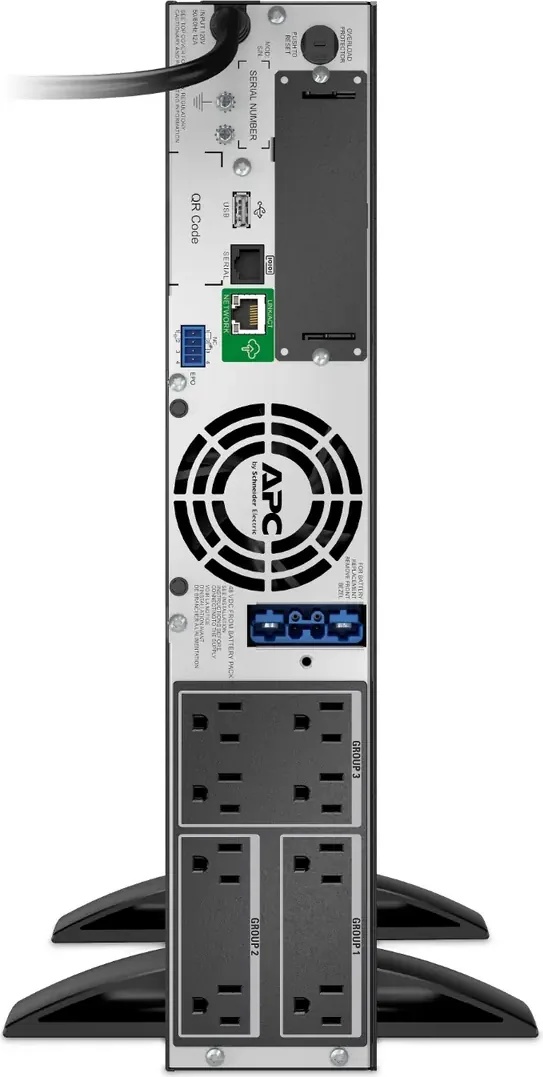

Check the exact equipment
Amazon.com model searches can include alternatives. Confirm the full model, electrical configuration, seller, condition, included hardware and warranty.
Make the system visible before comparing quotes
A bill of materials should describe what must arrive for a rack UPS project to work. A chassis with a suitable watt rating may still lack the battery enclosures, rails or management components needed for the approved design. Start from the required outcome and make every dependency a named line. This turns a broad shopping search into a configuration that a supplier, installer and receiving team can check independently.
Use separate columns for exact part number, role, quantity, compatibility evidence, supplier inclusion and owner. Mark whether a part comes inside the base package or must be ordered separately. Do not assign a second purchase line to an accessory merely because it appears in a feature list; confirm its actual inclusion first. Conversely, do not assume a catalog photograph establishes that every pictured component will be shipped.
Separate the UPS from its battery arrangement
Name the base unit with its full regional suffix and voltage. Then record the installed internal battery arrangement and any external enclosures. The APC SMX1500RM2UC, Eaton 5PX1500RTG2 and CyberPower OL1500RTXL2U provide documented examples of expandable systems, but their battery ecosystems are different. Similar enclosure height or nominal battery voltage does not make a pack interchangeable. Use current exact-model compatibility information for each proposed connection.
The SMX1500RM2UC documentation identifies SMX48RMBP2U packs; the 5PX1500RTG2 has its own 5PXEBM48RTG2 path; OL1500RTXL2U identifies BP36V60ART2U. Record those supported relationships in the bill rather than abbreviating every accessory to external battery. A future service technician should be able to distinguish the initial runtime expansion from replacement of an internal cartridge without reconstructing the procurement conversation.
Use runtime requirements to determine quantities
Battery quantity should follow a documented duration requirement at the protected watt load. Attach the applicable manufacturer runtime evidence and state its configuration. Do not multiply the base minutes by the number of enclosures. Ask the supplier to explain the supported configuration if a required load lies between published points. Keep any interpolation or planning assumption visible so it is not mistaken for a measured installation result.
Include the physical consequences of the selected battery arrangement. Each enclosure needs its supported mounting and cable route, and the complete assembly needs an approved handling plan. Reserve its rack space in the layout. A bill that calls the project a 2U UPS while omitting the height of required battery enclosures misrepresents the installed system even when the base-unit description is technically correct.
Enumerate mounting and connection parts
List rails, mounting ears, tower supports where relevant, and any manufacturer-required interconnection components. Confirm which hardware fits the rack type and mounting distance. A generic rail description may conceal a kit intended for a different chassis or rack arrangement. The approved installation instructions should identify how the equipment is supported. Do not treat front ears as proof that a heavy UPS can be installed without the required support.
Connection parts also deserve exact descriptions. Identify input connections, battery cables, management cables and approved equipment cords where they are part of the project. Distinguish a supplied cable from a site-provided one. If a battery module has an additional charging-supply requirement, assign review of that connection to the installer. A convenient bundle title is not a substitute for a complete connection diagram and a confirmed source arrangement.
Purchase communication as a complete path
A network management card is a separate line when required and not included. Record the specific card, compatible UPS firmware or hardware conditions, and associated software. For the CyberPower online example, the existing manufacturer documentation identifies optional RMCARD205 management; that does not establish inclusion in every seller's package. Require the delivered card identity rather than accepting a general claim that remote management is supported.
Software entries should identify the deployment, supported environment, license basis and continuing update requirements. If several hosts must shut down, record the agents or management services involved and who installs them. Network switches carrying the shutdown messages may already exist, but they still belong in the dependency plan and protected-load inventory. A card and a downloaded installer do not by themselves prove that the required workflow is operational.
Keep services and ownership costs visible
Add installation, configuration, commissioning, removal, shipping and disposal coordination as explicit scope items, even when their price is quoted elsewhere. State who owns each task. Battery replacement work and future software entitlement may not be immediate purchases, but the ownership plan should identify them. This avoids approving a system whose initial hardware fits the budget while required administration and maintenance remain unfunded.
For an illustrative branch-office project, one supplier might quote a base UPS and another might include an external pack, rail hardware and shutdown setup. The lower hardware subtotal does not tell you which offer is preferable. Normalize both against the same approved configuration first. Then compare documented inclusions and exceptions. This method works without inventing prices or assuming that more accessories always produce a better purchase.
Use the bill to receive and maintain the system
At receiving, match each line to a delivered item and record shortages before the installation appointment. Keep serial numbers and battery identification in the asset record rather than on a publicly shared quotation. Check damage and package contents using the supplier's claim process. A missing proprietary cable discovered after the maintenance window begins can be more disruptive than its purchase cost suggests.
After commissioning, update the bill to the installed configuration. Note substitutions, unused parts and the location of spare hardware. Link the approved operating settings and drawings. This makes later expansion safer to review because the engineer can identify the actual battery count and management components. The initial purchase order records what was requested; the maintained bill records what the rack now depends on.
Give each complete assembly a parent line and identify its required subcomponents beneath it. This is especially useful when a cable arrives inside an enclosure package but replacement batteries arrive separately. The receiving team can check physical quantities without accidentally double-ordering included parts. Ask the supplier to confirm the packing arrangement and mark any item shipped later. A battery system should not be declared complete merely because the number of cartons matches an informal expectation. Reconcile the parts against the supported installation drawing, then leave a dated record of the final accepted quantities for the maintenance owner.
| BOM line | Record before ordering | Receiving evidence |
|---|---|---|
| Base UPS | Full regional SKU and quantity | Actual label, serial record and condition |
| Internal battery | Included supported arrangement and service part | Identity and date evidence |
| External batteries | Exact enclosure, quantity and compatibility | Each enclosure and required interconnect |
| Mounting | Rail kit, brackets and rack compatibility | Part identities and required fasteners |
| Communications | Card, cable and software deployment | Included hardware and entitlement evidence |
| Connections | Required approved cables and supplied quantities | Correct connector and complete package |
| Services | Installation, acceptance and removal owners | Booked scope and handover deliverables |
Balance detail with a controlled shortlist
- Pros: Complete configurations are comparable, receiving checks become concrete, and service staff inherit exact component identities.
- Cons: Accessory compatibility requires research, bundle contents can change, and a long parts list needs an owner to remain accurate.
Approve a modest set of supported alternatives rather than a loose instruction to buy anything equivalent. If a supplier proposes a different battery or card family, require an updated compatibility record and installed layout. The decisive question is whether the assembled system meets the original requirement. A complete bill makes that question answerable before an incomplete collection of individually plausible components reaches the rack.
Compare relevant models on Amazon
Amazon.com model searches can include alternatives. Confirm the full model, electrical configuration, seller, condition, included hardware and warranty.
Sources and research basis
- Schneider Electric SMX1500RM2UC US pagePrimary documentation · checked 15 October 2026
- Schneider Electric SMX1500RM2UC exact-model datasheetPrimary documentation · checked 15 October 2026
- Eaton 5PX1500RTG2 exact US product specificationsPrimary documentation · checked 15 October 2026
- Eaton 5PX G2 North American technical specificationsPrimary documentation · checked 15 October 2026
- CyberPower OL1500RTXL2U official US product pagePrimary documentation · checked 15 October 2026
- CyberPower current Smart App Online catalogPrimary documentation · checked 15 October 2026
Thumbnail image credits
- Product photograph: Schneider Electric / APC: SMX1500RM2UC manufacturer product photograph
- Product image: Eaton: Eaton 5PX1500RTG2 manufacturer product image
- Product photograph: CyberPower, extracted from its manufacturer datasheet: CyberPower OL1500RTXL2U manufacturer product photograph
Recommendations interpret the linked documentation. We have not physically tested this equipment and claim no original runtime, acoustics, switching or efficiency results. Report a correction.